
)
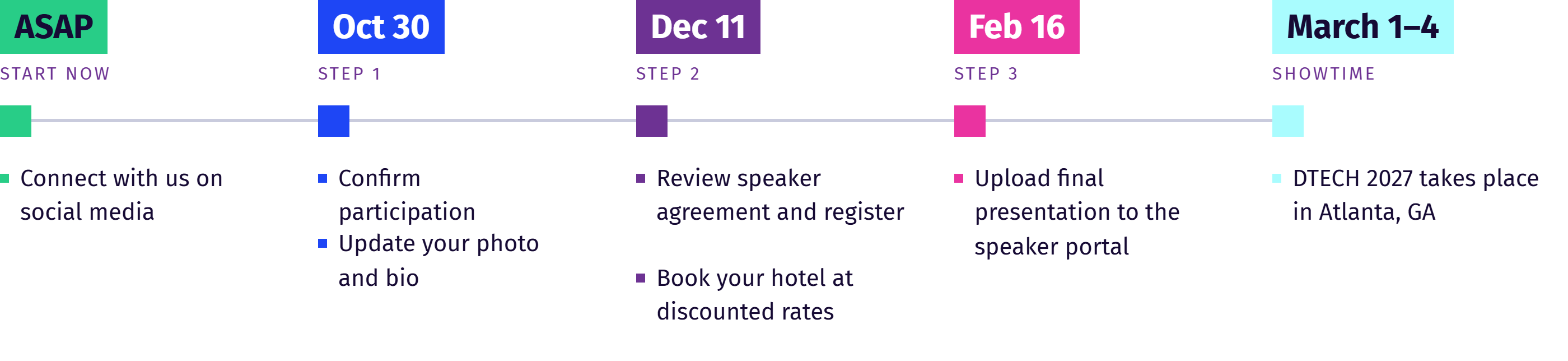
Speaker Portal: ASAP
This is your go-to-source for all your needs to prepare for the event include confirming your participation, speaker details, presentation presentation upload, and more.
Invitation Only Rates: ASAP
You will receive an email from Snoball with custom invitations to invite your network to attend at a discounted rate.
Travel & Hotel: By January 20, 2027
Visit the travel resources website page for information getting to the event including the discounted hotel rate.
View the schedule before booking travel.
Registration: By Dec 11
All speakers will receive a complimentary speaker badge. Visit the speaker portal to complete the speaker agreement and to register.
Questions?
Contact
Haley Isler at
dtechconference@clarionevents.com.
Required PPT Template
Visit the Speaker Portal to access the template that must be used for opening and closing slides.
* Logo Exposure: Vendor on opening and closing slides Utilities on all slides
The session chair will reach out early February address any questions you may have.
Uploading Presentation: By Feb 16
By February 16 to the
Speaker Hub. Once uploaded, attendees can access it (including handouts) during and after the event.
Session Setup
Setup will be in theater or rounds.
AV: Laptop, slide advancer, projector, screen, speakers, 3 handheld and 1 1 podium microphone, and confidence monitor.
Internet: Basic WiFi is provided.
For large downloads or streaming, embed the video, upgraded internet or bring a personal hotspot.
You can view the dates and times of your sessions by logging into your speaker portal. The full conference program will be available on the website in late August.
Most conference sessions are 50 minutes. Some sessions are split into two presentations, each lasting 25 minutes—this will be noted in the program schedule. Knowledge Hub sessions on the exhibit floor are 30 minutes long. Click here to view the full schedule.
You can find detailed information about your session, including the names of other speakers, in your speaker portal. The entire program will also be available on our website in late August. Click here to view the full schedule.
Speakers should be in the room where they are scheduled to speak at least 10 minutes before to set up your computer and presentation BEFORE the session starts. There will be an AV tech on hand to assist and a committee chair to introduce you.
Speakers should bring their presentation on a USB OR their computer. Show management will not be able to provide access to any previously loaded presentations. If your company does not allow for use of a USB, please bring your personal computer to access your presentation.
Meeting beforehand is at the discretion of your session chair. We recommend meeting with them in the Speaker Ready Room, B208, on the morning of your session if possible. They will contact you 30-days prior to the event to confirm those details with you.
There will be a laptop computer on the podium, slide advancer, projector, screen, speakers, 3 handheld microphones, a podium microphone, internet, and confidence monitor.
Smart City provides complimentary basic WiFi in the meeting rooms, ballrooms, and lobby areas, suitable for simple tasks like texting, calling, and checking email. If you need to download large files or stream videos, we recommend purchasing upgraded internet from Smart City or using your personal hotspot.
Use a USB or your computer to access your presentation. Any presentations or handouts uploaded prior to the conference will ONLY be used for conference proceedings.
Speakers in conference sessions receive a complimentary All Access Pass. Knowledge Hub speakers receive a complimentary exhibition badge.
When registering through the link in the speaker portal, you can also add ancillary events to your badge, such as Tech Tours, Workshops, Grid University, and more.
Yes, there is a Speaker Ready Room in Room B208 at the Georgia World Congress Center in Atlanta, Georgia. You'll find stations to review and edit your presentation, with staff available to assist you with any questions.
Smart City provides complimentary basic WiFi in the meeting rooms, ballrooms, and lobby areas, suitable for simple tasks like texting, calling, and checking email. If you need to download large files or stream videos, we recommend purchasing upgraded internet from Smart City or using your personal hotspot.
Yes, you are required to use the slide template available in the Speaker Portal for your opening and closing slides.
Logo Exposure:
- Vendor company logos are allowed only on the opening and closing slides
- Utility logos may be used on all slides.
Your session chair will receive your contact information about 30 days before the event. They are expected to introduce themselves and address any content-related questions by Early-February.
We recommend following the important deadlines above and utilizing the Speaker Portal.
When you are on show-site, we recommend picking up your name badge the day before or a few hours before your presentation to avoid long lines.
We also recommend connecting with your Session Chair in the Speaker Ready room.